


PINK—Clothing, Beauty & More
4.837.63K Reviews
App Specs
- Version
- 15.1.0.137
- Updated On
- License
- Free
- Downloads
- 5,000,000+
- Developer
- Victoria's Secret Mobile App
- Categories
- Shopping
- Platform
- Android
Screenshots
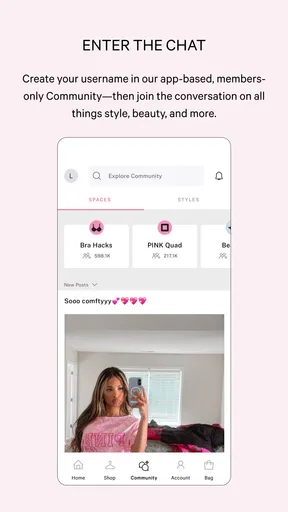
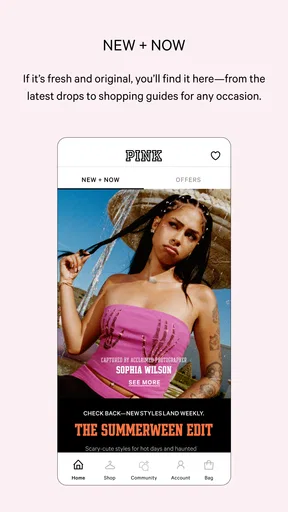
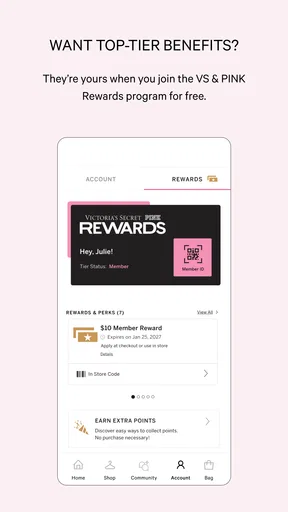
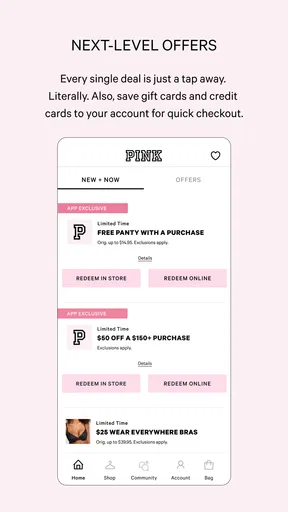
 Analysis by AppCompare
I found PINK—Clothing, Beauty & More most useful as a focused shopping companion rather than a general fashion marketplace. It brings PINK by Victoria’s Secret’s clothing, intimates, and beauty range into a mobile storefront, so the experience is centered on browsing that one brand instead of comparing dozens of unrelated sellers. I would recommend it to someone who already knows the PINK style or wants an easier way to explore its collections from a phone. I would not choose it as my only shopping app if I wanted broad brand comparison, secondhand options, or the ability to combine several retailers in one basket.
The app is free, and its shopping category is immediately clear from the way it presents the catalog. It is developed by Victoria's Secret Mobile App, has a Teen content rating, and supports devices running Android 8.0 or later. Its current version is 15.1.0.137, while the app itself has been available since September 17, 2011. Those details matter in a shared household: the age label helps set expectations, and the operating-system requirement is worth checking before trying to install it on an older phone.
How it works when shopping from a shared phone
A realistic use case is a household where one person is looking for casual clothes, another wants to check beauty items, and the phone is shared between errands. In that situation, I would use the app for browsing and product discovery, then hand the device over only after moving away from any personal account or checkout screen. The catalog is convenient for this kind of quick handoff because each person can look through the same brand without opening several retailer apps.
That convenience should not be confused with a shared shopping account. A phone can be shared, but a signed-in shopping session belongs to one person. I would avoid leaving an account open when another household member is going to browse, especially if saved details, order history, or personalized selections are visible. The safest routine is simple: browse together or separately, but keep account access and payment decisions with the person who owns them.
This is also where the app feels different from visiting a physical store. A store visit naturally separates browsing from payment because the shopper reaches a staffed checkout. On a phone, the transition can happen with a tap, so I prefer treating the basket as a planning area until the intended buyer reviews everything. That small pause is useful when several people are discussing sizes, colors, or gifts on the same device.
Keeping browsing separate from buying
I found it helpful to divide a shopping session into three stages: explore the clothing and beauty sections, inspect individual items carefully, and only then decide whether anything should move toward purchase. This prevents a family member who is merely looking from accidentally changing the intended order. It also makes the app more useful for gift planning, because someone can browse styles without assuming that the person holding the phone is ready to buy.
The focused catalog is an advantage here. Instead of filtering through a vast marketplace, I can stay within PINK’s own range and compare the brand’s different types of products. The trade-off is that the app cannot replace a multi-brand shopping tool. If I am trying to find the lowest price across retailers, compare competing labels, or build one order from several stores, I would leave this app and use a broader alternative.
Worth Reading Before You Choose

EA SPORTS FC Mobile 26 Is a Bigger Football Game, but It Takes Time

Flipboard Shows What News Apps Must Do Beyond the Feed

Switching to Android Auto Means Rethinking Your Driving Routine

Google Calendar Makes a Crowded Week Easier to Manage

Ludo King Makes the Most of the Minutes Between Plans

Baby Panda World Brings Quick Play to Modern Phones, but Its Game Library Feels Busy
For a shared device, I would also avoid relying on a remembered basket as a household to-do list. A basket is easy to misunderstand when different people use the same phone. One person may think an item is reserved, while another may remove it or add something else. A written note or a separate conversation is better for coordination than assuming that the app’s current shopping state represents everyone’s intentions.
Account boundaries that make sense
The most important setup decision is deciding who the account belongs to before anyone starts browsing seriously. If it is my account, I would keep my sign-in details private and let other household members browse without taking over the account. If a younger family member is using the phone, I would supervise the point where browsing becomes personal-account activity, particularly if the device is already signed in.
I would not create a shared login simply because several people like the same brand. Shared credentials make it difficult to tell who changed a basket, viewed an order, or altered account information. They also blur responsibility if a purchase is made by mistake. Separate adult accounts, or browsing without signing in until the actual shopper is ready, create a cleaner boundary than one household profile used by everyone.
Another practical boundary is the difference between the phone owner and the buyer. The person who owns the device may not be the person paying, receiving the order, or deciding whether an item is suitable. Before checkout, I would hand the phone to the buyer and let that person verify the final details. This is especially important when the app is used for a gift, a shared household purchase, or an order involving someone who is not the regular device owner.
The Teen rating is useful context, but I would treat it as an age signal rather than a substitute for family judgement. A teenager may be perfectly capable of browsing clothing, intimates, and beauty products, while still needing an adult conversation about spending, delivery information, and what happens at checkout. The app can support the shopping research; it should not decide the household’s rules.
Coordinating sizes, styles, and gifts
One of the better ways to use this app with another person is as a visual shortlist. Instead of passing the phone back and forth while making instant decisions, I would ask each shopper to identify a few items, then compare those choices together. That approach reduces accidental purchases and makes disagreements more manageable: one person can explain the style they like, while the buyer checks whether it fits the actual need.
For clothing, I would slow down at the product-detail stage rather than judging an item from a thumbnail. A polished image can make a garment look suitable for several situations, but the practical questions are different: is it for everyday wear, lounging, exercise, layering, or a gift? The app is strongest when it helps narrow the brand’s selection; the final choice still requires attention to the listing details and the recipient’s preferences.
Beauty shopping benefits from an even more careful conversation. A shared device may make it easy to show someone a product, but personal suitability is not something I would assume from appearance alone. If I am buying for another person, I would confirm that the product type matches what they actually want before treating it as a good gift. The app helps with discovery, but it cannot replace knowing the recipient’s routine or preferences.
For household coordination, I would use a simple rule: one person researches, the intended buyer confirms, and only the intended buyer completes the transaction. That rule works whether the purchase is for one person or several. It also prevents the common shared-phone problem where a casual “look at this” session quietly turns into an order that nobody has clearly approved.
What the app is like for teenagers and adults
The Teen content rating makes the app a reasonable candidate for older children and teenagers who are shopping for clothing or exploring beauty products, but the right level of independence depends on the household. I would be comfortable treating browsing as a conversation starter, not as an automatic permission to purchase. A teenager can build a shortlist, compare styles, and discuss what they need while an adult retains control of payment and account information.
Adults may appreciate the same separation for a different reason. The app is convenient for browsing on the go, but convenience can encourage impulse decisions, particularly when someone is tired or shopping between other tasks. I prefer saving the final review for a calm moment. That is when I can check whether the item matches the purpose, whether another household member has already chosen something similar, and whether the purchase is genuinely wanted rather than simply attractive on screen.
Trust also matters when the app is installed on a family tablet. I would make sure everyone knows which account is active and avoid leaving private order information open for the next person. If the tablet moves between adults and teenagers, a clear verbal rule is more dependable than assuming that everyone understands the difference between browsing a public catalog and viewing a private account area.
The app’s long availability and its strong user response suggest that it has become a familiar destination for people interested in the brand. It carries an average rating of 4.8 from around 175 thousand ratings, and it has passed 5 million installs. I see those figures as evidence of broad adoption, not as proof that every shopper will enjoy it. A person who dislikes the PINK aesthetic, needs extensive retailer comparison, or prefers in-person fitting may still find a different shopping method more useful.
Where it fits among shopping alternatives
Compared with a general marketplace, this app feels more coherent because the products belong to one brand family. That makes it easier to stay within a particular look and browse clothing, intimates, and beauty without switching between unrelated storefronts. The downside is obvious: the selection is limited to that brand’s world. A marketplace is better when I want multiple labels, independent sellers, broad price ranges, or one combined order.
Compared with a mobile browser, a dedicated app can feel more natural for repeated shopping because the experience is built around the brand instead of a browser tab. However, a browser remains useful when I am researching several retailers at once or using a shared device where I do not want to leave an account session behind. For a one-time search, the browser may be enough; for someone who regularly shops PINK, the dedicated app is the more focused option.
Compared with visiting a store, the app wins on convenience and private browsing. I can explore options without traveling and discuss a shortlist with someone elsewhere. A physical store is still better when fit, fabric, color, or immediate availability matters more than convenience. I would use the app to prepare for a store visit just as readily as I would use it to shop from home.
Small habits that improve the experience
My first tip is to browse with a purpose. Choosing a category before opening the app keeps the session from becoming an endless scroll through attractive but unnecessary items. If I am shopping for everyday clothing, I focus on that need first; if I am looking for beauty, I keep the search separate. This is especially helpful when several people are using the same phone because each session has a clear goal.
My second tip is to treat the basket as temporary. I would review it from the perspective of the actual buyer, not the person who happened to add the items. That review should confirm who the purchase is for, whether duplicates are intentional, and whether the selected products still match the original plan. This habit is more valuable on a shared device than simply trying to remember who added what.
My third tip is to use a handoff ritual. Before passing the phone to another person, I would leave the product catalog rather than an account page, and I would say whether the session is only for browsing or includes a specific purchase task. That may sound overly careful, but it removes ambiguity without making ordinary shopping difficult.
My fourth tip is to avoid treating the app’s brand focus as a complete wardrobe solution. PINK can be a good starting point for a coordinated style, but I would still compare the intended item with what the shopper already owns. That is where a focused brand app can encourage overbuying: the catalog is easy to explore, and a household may mistake matching products for actual need.
Who should use it, and who should skip it
I would point this app toward PINK shoppers who want a direct way to explore the brand’s clothing, intimates, and beauty selection. It also suits households where one person wants to research items for another, provided the account and checkout boundaries remain clear. The free download lowers the commitment to trying it, and the Teen rating gives families a useful starting point for deciding how it fits into a teenager’s shopping routine.
I would skip it if my main goal were to compare many brands, hunt across resale platforms, or manage purchases from unrelated retailers in one place. I would also choose a store or a broader shopping service when fit and immediate comparison are more important than brand-focused browsing. The app is not a universal replacement for every way of shopping; its value comes from being specific.
Device compatibility is another practical filter. Because it requires Android 8.0 or later, I would check the phone or tablet before planning a shared shopping session. On a supported device, the free installation makes experimentation easy. On an older device, using another shopping route may be less frustrating than trying to make the household’s main phone serve as the only option.
My household verdict
After using it as a shopping tool, I see PINK—Clothing, Beauty & More as a good choice for focused brand browsing, especially when the shopper already has a clear interest in PINK’s style. Its strongest quality is concentration: it keeps the experience centered on the brand’s clothing, intimates, and beauty range instead of burying those products inside a huge marketplace.
For shared use, I would recommend it with boundaries rather than treating it as a family account. Let people browse together, keep personal sessions separate, make the buyer confirm the basket, and discuss age-appropriate use instead of assuming the Teen rating answers every household question. Those habits address the real friction points: mistaken additions, unclear ownership, and private account information left on a communal device.
My final recommendation is positive but specific. Install it if PINK is already the brand you want to explore and you value a direct mobile shopping experience. Keep another option available if your household needs wide brand comparison, in-person fitting, or a single place for every retailer. In the right situation, this app makes coordination easier; outside that situation, its narrow focus becomes its main limitation.
Pros
- Trendy clothing and beauty products are easy to browse in one place.
- Frequent promotions can make selected items more affordable.
- Product photos help compare colors
- patterns
- and overall styles.
- The app offers convenient shopping from a mobile device.
- A broad catalog provides options for casual and seasonal looks.
Cons
- Sizing may vary between products
- making fit harder to predict.
- Some items may sell out quickly due to limited availability.
- Shipping times and costs can differ depending on the order.
- Colors may look slightly different from the photos in person.
- The large catalog can make finding a specific item time-consuming.
FAQs for PINK—Clothing, Beauty & More
What is PINK—Clothing, Beauty & More?
PINK—Clothing, Beauty & More is the official shopping app for PINK, offering access to women’s clothing, activewear, sleepwear, underwear, swimwear, beauty products, accessories, and seasonal collections. After installing it, users can browse products, view photos and descriptions, check available sizes and colors, save favorites, and place orders directly from a mobile device rather than visiting a physical store.
Can I use the PINK app to shop for clothing, beauty products, and accessories?
Yes. The app is designed to bring several PINK product categories together in one place. Depending on your location and current inventory, you may find bras, panties, loungewear, leggings, hoodies, pajamas, swimwear, fragrances, body care, bags, and other accessories. Product availability, collections, promotions, and beauty selections can change, so the app is useful for checking the latest online assortment.
Does PINK—Clothing, Beauty & More offer discounts or exclusive promotions?
The app commonly highlights sales, limited-time offers, new arrivals, seasonal promotions, and member-related benefits when they are available. Some deals may be shown only to signed-in customers or may require a promotional code, minimum purchase, or specific payment method. Before completing an order, carefully review the offer terms, expiration date, exclusions, and whether the discount applies to sale items or selected products.
Can I track orders, manage returns, and check shipping information in the app?
After placing an order, users can generally access order details and shipment updates through their account or confirmation information. The app may also provide guidance for returns, exchanges, refunds, and eligible store or mail options. Policies can vary by country, product type, and purchase method, so check the current return window, shipping charges, final-sale restrictions, and refund conditions before ordering.
Is PINK—Clothing, Beauty & More free to download, and is an account required?
The app is generally free to download, although normal mobile data charges may apply when browsing products or using it away from Wi-Fi. You may be able to explore items without immediately creating an account, but signing in is typically helpful for saving favorites, managing addresses, viewing order history, receiving personalized offers, and tracking purchases. Availability of features may differ by region and device.


